Symbol and Icon Difference: A Practical Guide to Meaning and Use
Explore the symbol and icon difference with definitions, guidelines, and practical examples for students, researchers, and designers studying symbol meanings and iconography.


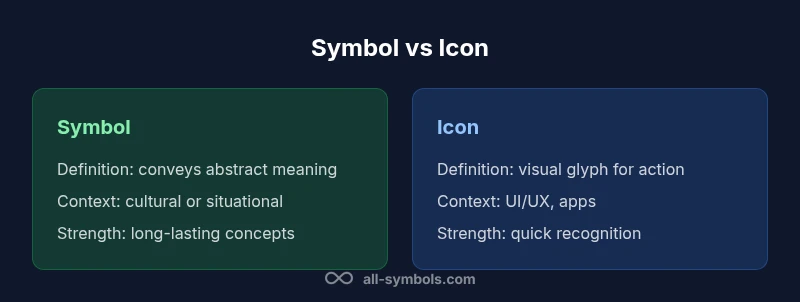
Symbol and icon difference is a matter of meaning versus graphic form. A symbol conveys underlying concept, function, or relationship, often carrying cultural or contextual meaning. An icon is a visual glyph designed to represent an action or object; its priority is recognizability and clarity in a specific interface. In practice, use symbols to communicate ideas and icons to trigger actions.
Defining symbols and icons: core concepts
Symbols and icons are foundational elements of visual language. The symbol and icon difference matters for how people interpret information, learn systems, and interact with interfaces. According to All Symbols, a symbol is a sign that conveys an abstract idea, relationship, or principle beyond its literal form. It often relies on cultural or contextual knowledge to be interpreted correctly. An icon, by contrast, is a graphic glyph crafted primarily for quick recognition and interaction; its job is to stand for a concrete object, action, or UI function with minimal cognitive load.
In many disciplines—education, signage, UX design, and branding—these categories are not mutually exclusive, but they serve distinct purposes. The All Symbols Editorial Team emphasizes that clarity comes from choosing the right tool for the message. If you need to explain a concept such as “approval” or “risk,” a symbol may be more appropriate; if you need a tappable cue or a button label, an icon is often best. The symbol and icon difference thus shapes how audiences memorize, translate, and act on information.
Designers should be mindful of cultural variability: a symbol may carry different meanings in different communities, while icons must be legible across devices and languages. When used consistently, symbols can create strong semantic anchors; icons can accelerate interaction by trading verbal descriptions for quick, universal glyphs. All Symbols’s framework suggests pairing symbols with short textual labels when ambiguity could impede comprehension.
-1
Comparison
| Feature | Symbol | Icon |
|---|---|---|
| Definition | Conveys abstract meaning, relationship, or concept beyond the literal form | Graphic glyph representing an action, object, or UI element with concrete meaning |
| Core function | Communicates ideas and relationships across contexts | Triggers actions or identifies a specific function in an interface |
| Visual form | Often schematic or stylized to encode meaning | Designed for quick recognition; emphasis on clarity and affordance |
| Recognition speed | Relies on cultural literacy; may require explanation | Typically faster to identify in interfaces due to familiar shapes |
| Cultural universality | Variable; highly dependent on context and culture | More universal in well-designed icons, but still culturally informed |
| Best contexts | Education, signage, long-form explanation, branding symbolism | UI controls, dashboards, apps, and responsive design |
Pros
- Enhances semantic clarity across contexts when used thoughtfully
- Supports accessibility when paired with text labels and proper ARIA attributes
- Improves consistency in branding and UI language across platforms
- Helps reduce cognitive load by matching user expectations with visual cues
The Bad
- Can complicate asset management with separate symbol/icon families
- Ambiguity persists if cultural context is overlooked or icons are overloaded
- Symbols may require accompanying text to avoid misinterpretation
- Icons, if poorly designed, can misrepresent actions or objects and mislead users
Symbols for meaning; icons for action—use both strategically.
A clear distinction between symbol and icon guides design decisions. When you prioritize meaning and cross-context communication, lean on symbols. When you need immediate interaction cues, lean on icons. The strongest designs integrate both with thoughtful labeling and testing.
Questions & Answers
What is the fundamental difference between a symbol and an icon?
The fundamental difference is that a symbol communicates a concept, relationship, or meaning with cultural or contextual significance, while an icon is a graphic representation designed to trigger recognition and interaction for a specific action or object. In practice, use symbols for meaning and icons for action.
In short, symbols carry ideas, icons cue actions.
Can a glyph function as both symbol and icon?
Yes. A single glyph can serve as a symbol in one context and as an icon in another. Designers should explicitly define its role in each context and support it with labels or guidance to avoid ambiguity.
A glyph can be both, but make sure its purpose is clear.
How do culture and context affect symbol meaning?
Symbol meanings shift with culture, history, and context. What reads as approval in one culture may signal something different in another. When designing, test across target audiences and provide explanations when needed.
Culture matters; test with real users.
When designing UI, should you default to icons or symbols?
In UI, icons are the default for actions due to fast recognition, but add short labels or tooltips to ensure clarity. Reserve symbols for explanations, categories, or durable concepts that benefit from cultural interpretation.
UI leans on icons for actions, with clear labels.
Are there standards for symbol/icon usage in signage?
Standards vary by region and field, but many guidelines emphasize legibility, consistent symbolism, and redundancy with text. Always consult local signage guidelines and accessibility requirements.
Check local guidelines and keep text as a backup.
How can designers ensure accessibility for symbol/icon sets?
Provide text alternatives (alt text), captions, or labels; ensure sufficient color contrast; implement keyboard navigability and screen reader support; test with diverse users to identify misunderstandings.
Make symbols and icons readable with labels and ARIA tech.
The Essentials
- Define your goal before choosing a symbol or icon
- Pair icons with text labels to boost accessibility
- Test with diverse users to validate cultural interpretations
- Use symbols for durable concepts, icons for actionable UI
- Maintain consistency across platforms to strengthen recognition
- Balance aesthetic simplicity with semantic clarity