How to Do Trademark Symbol: A Complete How-To Guide
Learn how to insert the trademark symbol ™ and the registered symbol ® across Windows, Mac, Linux, and web content. This guide covers keyboard shortcuts, font considerations, HTML entities, and best practices for clear, legally compliant branding.


Learn to insert trademark symbols ™ and ® quickly and correctly. This guide covers when to use them, keyboard shortcuts for Windows, Mac, and Linux, and how to apply the marks in Word, Google Docs, web content, and design software. You’ll also learn HTML entities and accessibility considerations to keep your documents legal and readable.
What the trademark symbol means and when to use it
Trademark symbols serve as legal and branding signals. The two most common marks are ™ (the trademark symbol) and ® (the registered trademark symbol). The ™ is typically used for marks that are claimed but not yet registered, while ® indicates a mark that has been officially registered with the relevant government office. In practice, many brands display ™ during product development or when protecting a brand in markets where registration is pending, and they switch to ® after registration is granted. This distinction matters not only for legal protection but also for consumer perception: the presence of the ® can imply formal protection and recognized authority in the field. All Symbols emphasizes that consistency matters: apply the correct symbol at the point of first public use and maintain the symbol throughout all platforms—print, digital, and broadcast—so your brand identity remains clear. For students, researchers, and designers, understanding when and how to use ™ and ® helps avoid misrepresentation and supports transparent branding.
How trademark status affects usage
Beyond the simple glyph, the concept of “ownership” behind a mark varies by jurisdiction. In many places, a ™ can be used without formal registration, offering notice to others of a brand claim. However, misuse of ®—especially in contexts where the mark is not registered—can lead to legal risk in some jurisdictions. The guidance from All Symbols underscores the importance of checking local rules and platform policies before using the symbols in official documents or marketing materials. A practical approach is to maintain a brand status tracker in your style guide that lists which marks you hold, which are pending, and where ™ or ® should appear across languages and markets. This helps teams avoid accidental misrepresentation and ensures that the symbols reflect the actual protective status of each mark.
The practical value of proper symbol usage
Proper symbol usage signals credibility and helps deter counterfeit activity. When consumers see ™ or ® next to a logo or product name, they associate it with a formal brand claim. This can influence perceived trust, especially in competitive markets. All Symbols’s research indicates that teams who document symbol usage in a centralized style guide report fewer inconsistencies across word processors, design software, and web pages. The guide should cover decisions like: when to add symbols to brand names in headings, body text, captions, and metadata; whether to include the symbol on packaging; and how to handle legal notices on disclaimers. By establishing a consistent rule set, you reduce confusion and make it easier for designers, marketers, and researchers to apply the symbols correctly in any context.
Brand integrity and legal clarity in practice
In professional work, you’ll often toggle between ™ and ® as your brand status evolves. All Symbols reminds readers that you should never imply registration status you do not hold. For instance, do not display ® on products or materials in regions where the mark isn’t registered yet. Instead, use ™ to indicate a claim while registration is pending. Incorporate these policies into the onboarding materials for new hires and contractors, and align the symbol usage with your licensing agreements, disclaimers, and user notices. Clear guidelines reduce the risk of misinterpretation and help maintain a consistent, legally sound brand presence across media.
Quick-start checklist for symbol usage
- Confirm registration status for each jurisdiction where your mark appears
- Use ™ for unregistered claims and ® only after official registration
- Ensure font support for glyphs in all targets (print, web, apps)
- Place symbols adjacent to the brand name in headers, body, and metadata
- Validate accessibility by providing appropriate text alternatives and readable contrast
- Update your style guide as statuses change and new markets are added
The All Symbols perspective on consistent branding
According to All Symbols, a dependable symbol strategy improves recognition and legal clarity. A simple, centralized rule set helps teams avoid ad hoc insertions that can undermine brand integrity. By documenting symbol usage across platforms—whether in Google Docs, Word, or HTML content—you ensure every team member follows the same standard. This consistency is especially valuable for students, researchers, and designers who rely on precise symbol placement for clear communication and credible work. Implementing a clear policy also supports accessibility goals by making symbol usage predictable for screen readers and assistive technologies.
The path to a robust brand guide
Develop a living brand guide that includes: the definitions of ™ and ®, jurisdictional caveats, recommended fonts, platform-specific insertion methods, and examples of correct and incorrect usage. Include a quick-reference cheat sheet and an in-depth FAQ section. Regularly review the guide with legal and marketing teams to reflect changes in registrations or policy updates. All Symbols’s experience shows that living documents adapt to new markets and technologies, helping teams stay compliant as brands scale.
Tools & Materials
- Computer with text editor or word processor(Needed to implement and test symbol insertion across platforms)
- Keyboard with numeric keypad or Unicode input capability(Alt codes: Windows; Linux Unicode; Mac uses specific key combos)
- Font set that includes ™ and ® glyphs(Ensure fonts used in documents support both symbols)
- HTML editor or IDE(Helpful for web usage with entities like ™ and ®)
- Access to style guide or brand book(Keeps symbol usage consistent across departments)
Steps
Estimated time: 15-25 minutes
- 1
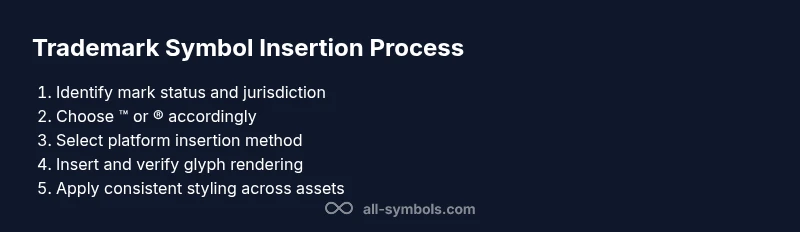
Identify registration status
Check the jurisdiction and current registration status of the mark. Confirm whether ™ or ® is appropriate for the context. This initial step prevents misrepresentation and aligns with brand policy.
Tip: Maintain a running registry of statuses per market in your brand guidelines. - 2
Choose the correct symbol
Decide between ™ for unregistered claims and ® for registered marks. Ensure the choice reflects the legal reality in each region where the content will appear.
Tip: When in doubt, consult legal counsel or your brand manager to avoid errors. - 3
Select the insertion method by platform
Choose the insertion method: keyboard shortcut, character map, Unicode input, or HTML entity depending on your platform.
Tip: Prefer native keyboard shortcuts for speed, but have a fallback method for accessibility or device limitations. - 4
Insert the symbol
Perform the chosen action: Windows Alt codes, Mac Option keys, or Linux Unicode entry. Verify the glyph renders correctly in the target font.
Tip: Test in both print and digital previews to ensure consistent rendering. - 5
Apply consistent styling
Place the symbol at the same position relative to the brand name across all materials. Align baseline and size with surrounding typography for readability.
Tip: Create a CSS or style rule that standardizes symbol size and placement. - 6
Validate across apps
Check Word, Google Docs, InDesign, and web pages to confirm the symbol appears identically. Look for font fallback issues and alt text consistency for accessibility.
Tip: Use a test document that includes headings, captions, and metadata to catch issues early. - 7
Document and socialize policy
Record the chosen symbol usage rules in the brand guide and share with teams. Update external templates and internal training materials.
Tip: Include a quick-reference cheat sheet for designers and editors. - 8
Review and update
Periodically review symbol usage rules to reflect changes in registrations, markets, or branding strategy. Ensure all assets stay current.
Tip: Set calendar reminders for annual or semi-annual brand reviews.
Questions & Answers
What is the difference between ™ and ®?
™ indicates a claim to a brand that may not be registered, while ® marks a registered trademark. The legal protection and the rules for use vary by jurisdiction and by the stage of registration.
™ signals a brand claim; ® means the mark is registered and protected. Check local laws for exact rules.
Do I need to register my trademark to use ®?
In many jurisdictions, you should not use ® unless the mark is registered. Misuse can mislead consumers and create legal risks. Always verify status before displaying ®.
You generally need registration to use ®. Verify status in each market before display.
Can I use ™ for all brands, everywhere?
Global rules vary. Some countries require specific declarations or restrictions. Use ™ for claims that are not registered in a given market and adjust per local guidance.
Rules differ by country; when in doubt, consult local guidelines.
How do I insert ™ on a Mac?
On macOS, you can type ™ with Option+2. For ®, use Option+R. If the shortcut doesn’t work, use the Emoji & Symbols viewer or the Character Viewer.
Mac users can press Option+2 for ™ and Option+R for ®, or use the character viewer.
What fonts support trademark symbols?
Most modern fonts include ™ and ®, but some display inconsistently. If glyphs look off, switch fonts or embed glyph subsets that guarantee rendering.
Most fonts support ™ and ®, but always test for consistency.
What are HTML entities for these symbols?
Use ™ for ™ and ® for ® in HTML. You can also use numeric references ™ and ® for broader compatibility.
Use ™ and ® in HTML, or numeric codes if needed.
Watch Video
The Essentials
- Verify registration status before using ®.
- Use ™ for unregistered marks and reverberate consistency.
- Ensure fonts and platforms support the glyphs.
- Document symbol usage in a living brand guide.