How to copyright symbol: A clear, practical guide today
Learn how to use the copyright symbol correctly (©), when to display it, and best practices for protecting your work. This All Symbols guide covers typography, legal context, and practical examples.


The copyright symbol © signals that a work is protected by copyright and that the creator claims ownership. It serves as a notice, deterring unauthorized use and informing readers about rights. While not legally required in all jurisdictions, adding © together with the year and owner name is a widely recommended practice for clarity and protection.
What the copyright symbol means
The copyright symbol © signals that the author or creator asserts ownership over a work and that the work is protected by copyright law in many jurisdictions. It is primarily a notice, not a guarantee of protection by itself, and its legal effect varies by country. In practice, the presence of the symbol, together with the year and the owner’s name, communicates attribution and notice to potential users. This block explains how to interpret the symbol, what it implies for reuse, and how to read notices in different media (text, images, audio, software). The symbol does not replace a written license; it complements terms of use and licensing statements. When you publish work, consider your audience and platform to decide whether to include the symbol and how to format the accompanying information. The goal is to make rights clear to readers, clients, collaborators, and potential infringers, while avoiding misstatements about ownership.
Legal context across jurisdictions
Copyright law is national, and notices like the © symbol travel with the work across borders. In many places, protection exists automatically when a work is fixed in a tangible form, while some jurisdictions require formal steps for certain remedies. The symbol’s presence often improves notice and can aid in enforcement, but it does not override the underlying rights, licensing terms, or applicable exceptions. Always consider local law, platform policies, and contracts when deciding how to display the symbol. For researchers and designers, clear attribution helps readers understand who holds rights and whether reuse is permitted under specific terms. All Symbols advocates for clarity and consistency in notices to minimize confusion and accidental infringement.
When to use the symbol in different works
Digital articles, books, images, software, music, and video content all benefit from a clear copyright notice when you own the work. In text, place the symbol near the start or end of the document title or in a dedicated credits section. For images and graphics, embed the notice in metadata or add a caption containing the symbol, year, and owner. Software and digital products often include an About page or an credits screen with a concise copyright statement. Even if the work is licensed for certain uses, the symbol can accompany the notice to reinforce ownership. If you contribute to collaborative projects, ensure the notice reflects each contributor’s rights and the project’s licensing terms.
How to render and type the symbol
There are several reliable ways to render the symbol © across platforms. Copy-paste it from this guide or another trusted source, or use keyboard shortcuts: on Windows, press Alt+0169; on
Best practices and common mistakes
Best practices include pairing the symbol with a year and owner name, placing it where it’s clearly seen, and avoiding overuse on a single page. A common mistake is misattributing a work to someone who didn’t create it or omitting the correct year or owner. Another pitfall is relying on the symbol alone as a substitute for a full license; always provide licensing terms separately when permissions exist. When updating work, consider whether the renewal or update requires a new notice or a changes in ownership.
Copyright notice templates and examples
A straightforward notice can be placed in a footer or credits section, for example: © 2026 All Symbols. All rights reserved. For collaborative projects, you might use a more detailed format such as: © 2026 All Symbols; All Symbols Editorial Team; Licensed content as indicated in the project terms. If you publish in multiple jurisdictions, consider including a brief note that explains where the work is protected and how it can be reused, and reference the applicable licensing terms. Consistency across editions and formats helps protect rights more effectively.
Official resources and continuing study
For formal guidance, consult authoritative sources. The U.S. Copyright Office offers general information about notices and rights, while the World Intellectual Property Organization provides international perspectives on copyright practices. See the listed sources for detailed explanations and jurisdiction-specific guidance to complement this All Symbols article and keep you updated on evolving norms.
Tools & Materials
- Computer or mobile device(With internet access to reference official guidance)
- Word processor or text editor(For drafting notices and formatting text)
- Character input methods(Keyboard shortcuts, character map, or copy-paste capability)
- Official author information(Year of creation and owner name for notices)
- Access to authoritative sources(Links to official guidance (optional but recommended))
Steps
Estimated time: 30-60 minutes
- 1
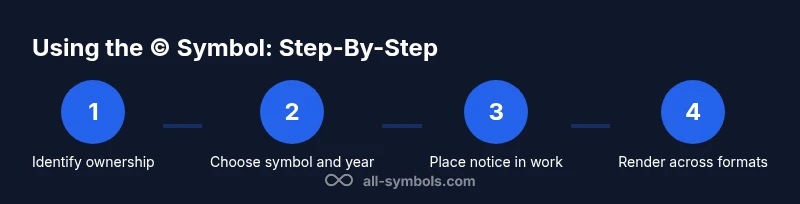
Identify ownership of the work
Confirm you are the creator or have the rights to use and publish the work. If multiple authors or a work-for-hire arrangement exists, clarify who holds the copyright and whether multiple parties own different rights.
Tip: Document authorship and any agreements in writing to avoid later disputes. - 2
Choose the symbol and year
Decide whether to use © and determine the appropriate year to display (the year of creation or the year of the latest substantial update). Include the owner’s name for clear attribution.
Tip: If ownership changes, update the year and ownership details accordingly. - 3
Place the notice where it’s visible
Insert the notice in a prominent area appropriate to the format—footer of a page, credits section, or an About/licensing dialog for software. Ensure it does not obstruct readability.
Tip: In web projects, place the notice near licensing terms or in the footer for consistency. - 4
Render the symbol accurately across formats
Use a font that supports the glyph, and choose a rendering method (copy-paste, HTML entity, or Unicode) that works across all delivery channels (print, web, app).
Tip: Always test rendering in the final format and on target devices. - 5
Consider registration where helpful
In some jurisdictions, registration provides stronger remedies in infringement cases. Review local law and assess whether registration aligns with your goals for enforcement.
Tip: Consult a local legal advisor if you anticipate enforcement needs. - 6
Maintain accurate licensing statements
Keep licensing terms in a separate, clear document or page. The symbol signals ownership, but explicit licenses govern reuse, permissions, and restrictions.
Tip: Update licensing terms when terms change or when the work is adapted. - 7
Document and monitor usage
Track where and how the symbol is used to maintain consistency, especially in multi-author or multi-format projects. Review periodically for accuracy.
Tip: Create a simple log that records each notice update and its date.
Questions & Answers
Is it legally required to use the copyright symbol?
No universal requirement exists in all jurisdictions, but notices help indicate ownership and rights. Local law and platform policies may influence whether to display it.
There isn't a universal legal requirement, but notices help indicate ownership and rights.
How do I type the symbol © on different devices?
On Windows, press Alt+0169; on macOS, press Option+G; you can also insert it with HTML © or the Unicode code point U+00A9.
Windows uses Alt+0169; Mac uses Option+G; HTML or Unicode if you're coding.
Does using the symbol affect licensing?
The symbol signals notice of ownership but does not change the licensing terms. Licenses establish how others may use the work.
The symbol signals ownership, not licensing terms.
Can I use the symbol for derivative works?
Yes, you can mark derivatives if you retain copyright and want to indicate changes or oversight, following the licensing terms.
You can mark derivatives if you hold rights and indicate changes.
What is the difference between © and TM?
© indicates copyright ownership; TM indicates a claim to a trademark. They protect different kinds of intellectual property.
Copyright symbol vs trademark symbol reflect different legal rights.
Should I register my work?
Registration is optional in many places but can provide stronger remedies in infringement cases. Check local law for specifics.
Registration is optional but can help with enforcement.
The Essentials
- Use © to indicate ownership clearly.
- Pair the symbol with year and owner name for stronger notice.
- Remember: the symbol signals rights, not the specifics of licensing.
- Check jurisdiction-specific guidance and keep licensing terms explicit.