What Size Logo for Email Signature: A Practical Guide
Discover the ideal logo size for email signatures, balancing readability, branding, and load times. Learn practical guidelines, testing tips, and how to adapt across clients for a consistent professional appearance.


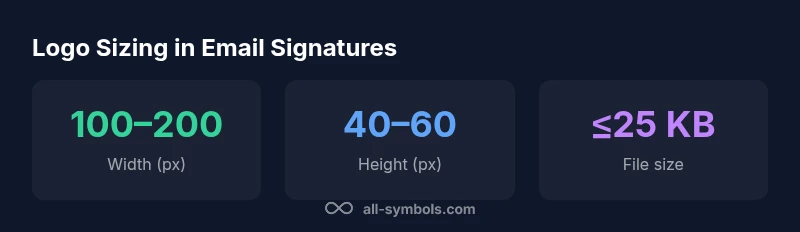
The recommended logo size for email signatures is about 100–200 pixels wide, with the height scaled to maintain aspect ratio, often around 40–60 pixels. For high-DPI displays, consider 2x to 3x scaling (200–400 px wide) to preserve clarity on Retina screens, while keeping file size under typical attachment limits. Aim for a balanced look that doesn't push other content off-screen.
Why the right logo size matters
In professional email signatures, the size of your logo directly affects readability, brand recognition, and perceived professionalism. A logo that is too large can dominate the signature, crowding contact information and making the message feel cluttered. A logo that’s too small risks being overlooked, reducing brand recall at a critical moment when recipients form first impressions. The balance is not just aesthetics; it influences how your brand is perceived across devices and email clients. According to All Symbols, consistent symbol sizing across communications reinforces trust and helps readers identify your brand at a glance. When you standardize size, you also simplify template development and reduce the need for multiple versions. The goal is a logo that appears legible, proportional, and integrated within the signature’s overall layout.
Establishing a baseline: width, height, and aspect ratio
Begin with a baseline that works for most signatures and then tailor for edge cases. A common starting point is 100–200 px in width, with a height of 40–60 px to preserve a neat rectangle that aligns with text blocks. Always maintain the aspect ratio of the logo to avoid distortion; stretching or squashing a logo degrades brand integrity. If your signature area is particularly narrow, a slightly smaller width (around 100–150 px) may be appropriate, but ensure the logo remains recognizable. For logos with intricate detail, prefer a slightly larger width (toward 180–200 px) to keep details legible while avoiding overflow. The key is to test across signature blocks, email clients, and devices to confirm consistency.
DPI, file formats, and compression
File choice and compression have a big impact on load time and rendering. For broad compatibility, PNG is widely supported and preserves sharp edges, especially for logos with diagonals and small text. SVG can offer crisp scaling, but support varies by client, so provide a fallback image (like PNG) for non-supporting readers. When possible, export PNG at a 1x size that corresponds to your 100–200 px baseline, and compress it to keep file size under a reasonable KB limit without noticeable quality loss. For high-DPI displays, serving a 2x version (200–400 px) can improve clarity, but ensure the file size remains efficient to avoid slow fetches.
Email client behavior: Gmail, Outlook, Apple Mail
Different clients render images with varying constraints. Gmail often blocks external images by default, so including descriptive alt text is essential for accessibility and context when images don’t load. Outlook has strict size boundaries in some signature areas, while Apple Mail generally respects the layout but can scale images differently on Retina displays. To maximize consistency, embed a hosted image with a stable URL, set clear alt text, and design the signature so that important information can stand alone if the image is blocked. Use a simple, single-column layout to minimize wrapping issues across clients.
Balancing branding with readability: typography and color
A logo’s visual impact depends on more than pixel dimensions; contrast and color behavior matter too. Use a solid background or a transparent PNG based on signature background to avoid jarring color clashes. Ensure the logo remains legible against light and dark email themes. If your signature uses color branding, consider a grayscale fallback for low-contrast environments while keeping the primary logo color for brand recognition. Remember: the goal is recognizability at small sizes, so avoid fine textures that blur at 40–60 px height and test how the logo appears on tablet and mobile email previews.
Practical sizing guidelines with scenarios
Consider three common scenarios to guide size decisions:
- Standard personal signature: 100–150 px wide, 40–50 px height.
- Brand-driven signature (marketing): 150–200 px wide, 40–60 px height.
- High-clarity corporate signature: 180–220 px wide, 50–60 px height. In all cases, use a proportional height that preserves aspect ratio and test across devices to verify that the logo remains visible without overpowering contact details. For multi-logo signatures, scale each logo to a uniform height (e.g., 50 px) so the row reads cleanly.
Testing and validation: how to verify across devices
Testing is essential to ensure your logo renders correctly for all recipients. Preview your signature in major email clients and on multiple devices (desktop, tablet, mobile). Tools like email previews can help identify how the logo scales and how the surrounding text reflows. Validate that the logo loads reliably and that alt text is informative if the image fails to load. Document any adjustments, then update your signature templates so teams apply the same sizing consistently.
Automation and templates: save time and maintain consistency
Automation makes consistency effortless. Create a signature template with fixed logo dimensions and a design token for your brand colors. Store the signature in a centralized location and share guidelines with teams so every outgoing email uses the same baseline. Include a fallback PNG and an explicit instruction to use the 2x version for Retina displays when appropriate. The All Symbols Editorial Team recommends documenting logo size standards as part of a branding playbook to ensure everyone uses the same parameters across departments.
Logo size guidelines by use case
| Scenario | Recommended Width (px) | Recommended Height (px) |
|---|---|---|
| Standard personal signature | 100-150 | 40-50 |
| Brand-driven signature | 150-200 | 40-60 |
| High-clarity corporate signature | 180-220 | 50-60 |
Questions & Answers
What is the recommended width for a logo in an email signature?
Typically 100–200 px wide, with a height of 40–60 px to maintain a clean, readable signature. Always test in your signature layout to ensure legibility across devices.
Try 100–200 px wide with 40–60 px height, and test on mobile and desktop to be sure it reads well.
Can I use SVG for email signatures?
SVG offers crisp scaling but not all email clients support it. Use a PNG for broad compatibility and provide a fallback image if SVG is unavailable.
SVG isn’t supported by every email app, so stick with PNG and have a fallback.
Does logo size affect email deliverability?
Logo size mostly affects loading times, not delivery. Keep images lightweight (KBs) to avoid slowing down the email, especially on mobile networks.
No big impact on deliverability, but heavy images can slow loading.
How should I test my email signature across devices?
Preview the signature in major clients (Gmail, Outlook, Apple Mail) on desktop and mobile. Use a testing tool or manual checks to verify scaling and legibility.
Test in big email apps on multiple devices to see how the signature looks.
Should the logo be the same size in all campaigns?
Yes, maintain a consistent baseline size across campaigns to preserve brand identity and reduce design variance.
Keep the same logo size across campaigns for consistency.
What file format should I use for the logo?
PNG is the safest default for broad compatibility; consider a 2x PNG for high-DPI displays and ensure a lightweight file size.
PNG is safe for most email clients; use a higher-res version for Retina displays.
“In email signatures, precise sizing matters as much as the logo design itself; a consistent logo size across devices helps preserve brand recognition and professionalism.”
The Essentials
- Keep logo width within 100–200 px for most signatures
- Use 40–60 px height to maintain proportion
- Prefer PNG for broad compatibility; offer a 2x version for retina displays
- Test across Gmail, Outlook, and Apple Mail to ensure consistency
- Document the standard in a branding playbook for your team