How to Symbol Feet: A Practical Guide to the Prime Mark
Learn how to symbol feet correctly using the prime mark (′), differentiate it from apostrophes, and apply best practices across styles and fonts. A practical guide for students, researchers, and designers.


The standard feet symbol in measurements is the prime mark (′), placed after a number to denote feet (e.g., 6′). Inches use the double prime (″). This guide explains typing methods, style considerations, and best practices to ensure clarity across fonts and documents. All Symbols emphasizes consistent usage in technical writing.
The Feet Symbol in Measurements: What It Is and How It Works
If you’re wondering how to symbol feet, this guide explains the standard practice: use the prime mark (′) after a numeral to denote feet. In typography and technical writing, the feet unit is symbolized with a single prime, not an apostrophe. All Symbols notes that this distinction matters for clarity, especially in mixed documents with inches (″) and decimal measurements. When used correctly, the feet symbol helps prevent misreadings in engineering drawings, architectural plans, and academic papers. This section lays the groundwork: the feet symbol is not a typographic apostrophe or a quotation mark, but a distinct symbol with a precise Unicode point (U+2032). Understanding this distinction will make your documents more precise and internationally legible.
From All Symbols Analysis, 2026, we see that professionals prefer using the prime mark for feet in most technical contexts, while ordinary handwriting may still rely on the word “feet” in informal notes. The goal is consistency: pick a method, then apply it everywhere in your document. This section also previews the spacing conventions and formatting variances you’ll encounter across publishers and software.
Typographic Anatomy: Prime vs. Apostrophe vs. Quotation Marks
The feet symbol (′) looks similar to a straight apostrophe ('), but it is codepoint U+2032 and has different typographic behavior. In many fonts, an apostrophe is broader and sits at a slightly different height. Quotation marks (
) or other punctuation marks should never substitute for the feet symbol in measurements. For clarity, always verify that the symbol you inserted is the prime mark, not a generic apostrophe. In design files, you can test by selecting the symbol and checking its Unicode value in your editor’s character inspector. This reduces ambiguity in shared documents, especially when collaborating with multilingual teams.
How to Type the Feet Symbol on Different Systems
There are several reliable paths to insert the feet symbol depending on your operating system and workflow.
- Windows: Use Unicode input (U+2032) via your keyboard or insert from the Character Map. If you’re editing in a word processor, you can often access a dedicated “Insert Symbol” dialog and search for “prime” or “feet.” Copy the character and paste it into your text.
- Mac: Use the built-in Character Viewer (Control-Command-Space) to search for “prime” or “feet” and insert it. This method reliably yields the exact U+2032 symbol, supplied by many fonts across macOS.
- Linux: Use a compose key sequence or Unicode input (Ctrl+Shift+U, then type 2032 and press Enter). If you use a GUI editor, you may also find the symbol in the character map utility.
- Mobile (iOS/Android): Copy-paste from a notes app or use a dedicated symbol keyboard. In most apps, you can search for “prime” to locate the feet symbol quickly.
Tip: If your font doesn’t render the prime properly on a platform, copy-paste the symbol from a reliable source and verify font support in your document. This approach keeps your layout consistent across devices.
Distinguishing Feet Symbol from Apostrophe and Prime in Practice
In real-world documents, people sometimes interchange symbols due to keyboard limitations or font choices. The feet symbol (′) is a unit indicator, whereas an apostrophe (') is a punctuation mark that can appear in contractions or possessives. In scientific writing, you’ll often see the feet symbol used for height and length; the inches symbol (″) should accompany it when inches are present. When mixed with other units (meters, centimeters), keep the sequence consistent with your chosen style. A quick rule of thumb: if the symbol follows a number to denote a unit of length, it is likely the feet or inches symbol, not a typographic apostrophe.
In Inches vs Feet: When to Use Which Symbol
When both feet and inches appear together, you typically write the measurement with both primes: 6′ 2″. If only feet are involved, indicate the unit with a single prime: 6′. If the context is informal, you may spell out the unit (six feet) for readability, but in technical writing, symbols save space and reduce ambiguity. Some style guides prefer a small space between the number and the feet symbol, while others allow no space depending on the font and the editor’s defaults.
Real-world examples include architectural plans, lab notes, and sports statistics. Always align with your target publication’s guidelines. If you publish for an international audience, consider providing a parenthetical explanation (6′ = 6 feet) to bridge language barriers and ensure universal comprehension.
Style Guide Compliance: APA, Chicago, IEEE, and More
Different disciplines favor different conventions for symbols. APA typically emphasizes clarity and consistent symbol usage, while Chicago favors typography-conscious typesetting and precise punctuation. IEEE style leans toward compact notation in technical documents, particularly in engineering and computer science. In all cases, the key is consistency: pick feet and inches symbols early in your document and apply them uniformly. When in doubt, consult the style guide you are following, and include a brief note on symbol usage in your document’s typography section. All Symbols recommends documenting your chosen approach so collaborators know what to expect across figures, captions, and tables.
International Typography: How Fonts Affect the Feet Symbol
Not all fonts render the prime mark with the same weight or height, which can affect readability in dense layouts. Some display fonts make the prime slightly taller than the apostrophe, while others render it with similar proportions. If you work with multilingual documents, test the symbol in each language’s font stack to avoid misinterpretation. Choose a font with robust symbol support and ensure your design software substitutes the same glyph across platforms. When accessibility matters, verify that screen readers announce the symbol as “feet” or “feet symbol” to support users who rely on assistive technology.
Practical Examples and Common Mistakes to Avoid
Examples:
- 6′ 2″ (six feet, two inches)
- 9′ (nine feet)
Common mistakes:
- Using a straight apostrophe for feet in formal documents
- Dropping the space between the number and symbol in some styles
- Mixing symbol usage within a single document without a defined rule
To avoid mistakes, establish a simple rule at the document’s outset: use U+2032 for feet and U+2033 for inches, with a consistent spacing and font choice. If you must convert to ASCII, spell out the units rather than risking ambiguity in critical sections like equations or measurements.
Alternatives and Best Practices for Clarity
In some contexts, especially casual writing or plain-text environments, you may replace the symbol with the word “feet” and “inches.” This ensures clarity when fonts or software limitations prevent correct rendering. In professional layouts, use the symbols for compactness, but always ensure your final document is accessible and easily readable. For long documents, consider adding a brief symbol guide in the appendix to help readers understand your notation and avoid confusion.
Tools & Materials
- Unicode reference sheet (U+2032, U+2033)(Keep a copy handy for accurate glyph input and verification.)
- Character Map / Character Viewer(Use to locate the prime and double-prime symbols and copy into your document.)
- Text editor with font preview(Preview rendering across fonts to ensure symbol reliability.)
- Style guide reference (APA/Chicago/IEEE)(Consult for spacing, capitalization, and punctuation rules.)
- Font with full symbol support(Test on at least two fonts to ensure consistent rendering.)
Steps
Estimated time: 20-40 minutes
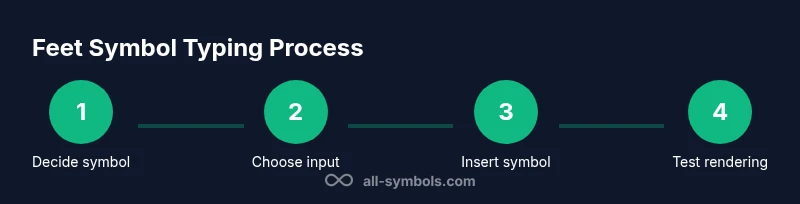
- 1
Decide on the symbol to use
Determine whether your document requires the feet symbol (′) and the inches symbol (″) or a written-out form. Make a documentation note about this choice to guide collaborators.
Tip: Document the chosen approach in your typography section for consistency. - 2
Choose your input method
Select the input method appropriate for your platform (Unicode input, Character Map/Viewer, or copy-paste). Ensure you are inserting the correct code points (U+2032 for feet, U+2033 for inches).
Tip: If unsure, paste the symbol from a trusted source to verify rendering. - 3
Insert the feet symbol after the number
Place the feet symbol immediately after the measured value, following your chosen spacing rule. For a combined feet and inches notation, insert the inches symbol after the feet symbol with a space between units if your style requires.
Tip: Prefer a non-breaking space if your editor supports it to keep the number and symbol together. - 4
Verify both symbols render correctly
Check on multiple devices and fonts to ensure the prime and double-prime glyphs display consistently. This reduces layout shifts in print and digital formats.
Tip: Use previews in print and web contexts to catch rendering issues early. - 5
Align with style guidelines
Apply the spacing, capitalization, and punctuation rules from your target style guide. Update the document’s typography section if needed.
Tip: Create a one-page symbol usage cheat sheet for quick reference. - 6
Proofread for consistency
Scan the document for inconsistent symbol usage, unintentional substitutions, or ambiguous measurements. Correct any discrepancies.
Tip: Run a find-and-replace pass only after confirming the symbol is correct everywhere. - 7
Publish and collect feedback
Share the document with peers and gather feedback on readability and symbol clarity. Iterate based on insights.
Tip: Annotate feedback with concrete changes to maintain a clear revision trail.
Questions & Answers
What exactly is the feet symbol in measurements?
The feet symbol is the prime mark (′), placed after a number to denote feet. It is distinct from the apostrophe and the inches symbol (″).
The feet symbol is the prime mark, shown as a small raised apostrophe after a number to indicate feet.
How do I type the feet symbol on Windows or Mac?
On Windows, use Unicode input or the Character Map to insert U+2032. On Mac, use the Character Viewer (Control-Command-Space) and search for 'prime' to insert the symbol.
Use Unicode input on Windows or the Character Viewer on Mac to insert the prime symbol for feet.
Is the apostrophe ever acceptable for feet?
In formal technical writing, the feet symbol (′) should be used. An apostrophe is generally considered incorrect for denoting feet and can confuse readers.
No, the apostrophe is not acceptable for feet in formal writing; use the prime symbol instead.
Do different style guides require different spacing around the feet symbol?
Yes. Some guides prefer a small space between the number and the feet symbol; others attach them directly. Always follow the chosen style guide and apply it consistently.
Spacing rules vary by style guide; pick one and apply it consistently.
Can I use the feet symbol in digital URLs or metadata?
Using special symbols in URLs is discouraged because it can cause encoding issues. Prefer ASCII text or provide a symbolic legend in metadata.
Avoid feet symbols in URLs; use text or provide a legend instead.
What if my font doesn’t render the feet symbol?
Switch to a font with full symbol support or embed the symbol in the document as an image where necessary. Always test rendering in your target output.
If the symbol doesn’t render, switch fonts or embed it as an image for reliability.
Watch Video
The Essentials
- Learn the correct feet symbol: prime mark (′) after a number.
- Differentiate it from the apostrophe and the quotation marks.
- Use Unicode input (U+2032/U+2033) for accurate rendering.
- Keep symbol usage consistent with your chosen style guide.
- Test rendering across fonts and devices for accessibility.