How to Rupee Symbol: Type ₹ and Use It Correctly Today
Learn to insert the rupee symbol ₹ with ease across Windows, Mac, and mobile. This guide covers Unicode U+20B9, HTML entities, fonts, and practical typography tips for clear currency representation.


Learn how to rupee symbol typing and usage. This quick guide outlines how to insert ₹ across platforms, access the Unicode code point U+20B9, and apply correct typography in documents and web pages. You’ll discover keyboard shortcuts, copy-paste methods, HTML entities, and practical formatting tips to ensure consistent currency representation.
What is the rupee symbol and why it matters
If you're wondering how to rupee symbol, the answer is ₹, the official mark of the Indian rupee. It blends Devanagari र with the Latin letter R to form a single glyph with two horizontal lines. Introduced in 2010 as a government design initiative, the symbol was created to unify India's scripts and strengthen global recognition. For designers and researchers, using the symbol correctly matters for readability, cultural accuracy, and professional tone. Always ensure the symbol sits before the amount in most contexts (for example, ₹1,000 vs ₹ 1,000 in some style guides) and that it matches the surrounding typeface. When you include ₹ in your work, check font support and glyph availability across platforms to avoid missing characters or inconsistent rendering.
Encoding and Unicode essentials
The rupee symbol ₹ is encoded in Unicode as U+20B9, and its UTF-8 representation is E2 82 B9. In practice, you can insert ₹ in HTML using the entities ₹ or ₹. In plain text, you can copy the glyph from a document with a font that supports it. On most modern systems, rendering ₹ relies on UTF-8, so ensuring your document uses UTF-8 encoding is essential for consistent display across browsers and devices. Designers should test ₹ at different font weights and sizes to ensure legibility across contexts.
Keyboard input: Windows and Linux
Windows users can insert ₹ reliably with an Alt code after enabling the numeric keypad. Activate Num Lock, hold the Alt key, and type 8377 on the numeric keypad, then release to insert ₹. If you’re on a laptop without a dedicated numeric keypad, you can use an on-screen keyboard or a software utility that provides alternative key mappings. Linux users often have direct Unicode input options, such as Ctrl+Shift+U, then type 20B9 and press Enter. Always confirm that the glyph renders correctly in your target app before finalizing any document or UI.
macOS and iOS input methods
Mac users can insert ₹ via the Character Viewer (Control+Command+Space), then search for ‘Rupee Sign’ or ‘Currency’ and double-click to insert. On iOS devices, switch to a keyboard with currency symbols or use the emoji/symbol picker to locate ₹, or simply copy-paste from a reliable source when needed. For both platforms, testing across apps (Pages, Word, browsers) ensures consistent rendering and avoids platform-specific quirks.
Web and document usage: HTML, CSS, and fonts
In HTML, the rupee symbol can be represented with the numeric character reference ₹ or decimal ₹. In CSS, you can reference the symbol using a Unicode escape like content: "\20B9"; Ensure your pages declare UTF-8 encoding to prevent garbled text. When choosing fonts for UI or print, verify that the font family includes a proper ₹ glyph. If a preferred font lacks the symbol, specify a fallback such as Arial Unicode MS or Noto Sans Symbols to preserve readability across devices.
Typography guidelines and style choices
Typography matters when rendering ₹ in long-form text or UI. Place the symbol before the amount without excess spacing in most contexts (₹1,000). Some style guides accept a space between the symbol and the number (₹ 1,000); pick one approach and apply it consistently. Be mindful of font weight, size, and kerning—₹ should maintain legibility at smaller sizes and in bold for emphasis in charts and headings. In multilingual documents, ensure the surrounding text remains legible when switching scripts (Latin vs Devanagari).
Practical usage in papers, slides, and apps
In academic papers, presentations, and software interfaces, ₹ should be treated as a currency token just like other symbols. Use it to label prices, budgets, and financial figures, and maintain consistent formatting across figures, tables, and captions. In slides, align ₹ with numeric data and avoid breaking the symbol across lines. In apps, test the symbol across UI elements, including buttons, labels, and charts, to ensure it renders consistently and remains accessible to screen readers.
Compatibility pitfalls and debugging tips
Common issues include missing glyphs, incorrect font fallbacks, and encoding mismatches. If ₹ appears as a box or question mark, switch to a font that supports the glyph, ensure UTF-8 encoding, and check your document’s metadata. When collaborating, share a style guide that specifies the correct usage of ₹, including punctuation, spacing, and alignment. Finally, consider creating a small visual reference sheet for designers and editors to reduce inconsistencies across languages and platforms.
Resources and further reading
For a deeper technical understanding of the rupee symbol, refer to Unicode documentation and typography resources. The All Symbols team highlights authoritative references on currency symbols, encoding, and typography to support students, researchers, and designers. Consult official Unicode charts for U+20B9, browser compatibility notes, and style guides from reputable publications to ensure your use of ₹ is accurate and accessible.
Tools & Materials
- Computer or mobile device(Any OS (Windows, macOS, Linux, iOS, Android))
- Font with ₹ glyph(Choose a font that clearly supports the rupee symbol (e.g., Arial, Roboto, Noto Sans))
- Text editor or word processor(For document work and typography testing)
- Unicode table or reference(Useful for locating U+20B9 and related entities)
- HTML editor or CMS(Helpful for web content and encoding checks)
Steps
Estimated time: 15-25 minutes
- 1
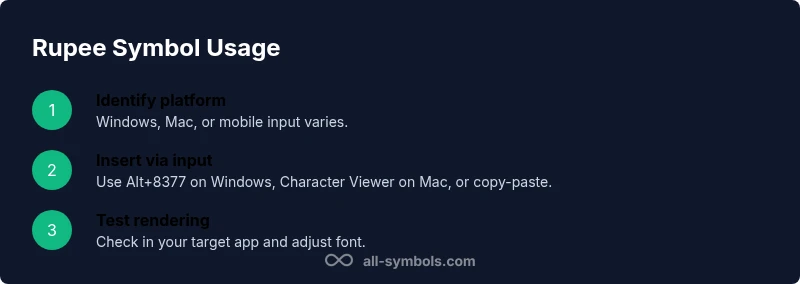
Identify platform and font support
Determine whether you’re on Windows, macOS, or mobile, and verify that your chosen font includes the rupee glyph. This upfront check prevents rendering issues later.
Tip: Test a simple line like ₹100 in your target app to confirm glyph availability. - 2
Choose a reliable input method
Select an input method aligned with your platform: Alt codes on Windows, Unicode input on Linux, or the Character Viewer on macOS/iOS. If you’re collaborating, standardize on a single workflow.
Tip: Having a fallback (copy-paste) reduces bottlenecks in workflows. - 3
Type ₹ with a keyboard shortcut (Windows)
If you have a numeric keypad, enable Num Lock, hold Alt, and type 8377. Release to insert ₹. Use an on-screen keyboard or a utility if the keypad isn’t available.
Tip: Keep Alt+8377 handy for quick edits in documents. - 4
Type ₹ with Mac or mobile input
Open the Character Viewer (Control+Command+Space) and search for 'Rupee Sign' to insert. On mobile, switch to a keyboard that includes currency symbols or copy-paste ₹ when needed.
Tip: For frequent use, add the rupee symbol to your quick-access clipboard. - 5
Use HTML entities and encoding for web
In HTML, insert ₹ or ₹. Ensure your document uses UTF-8 encoding and declare a proper charset at the top of the page.
Tip: Always validate your HTML with a validator to catch encoding issues. - 6
Apply ₹ in typography and formatting
Place ₹ before the amount (e.g., ₹100). Decide on spacing and apply it consistently across headings, body text, and data labels.
Tip: Document your chosen style in a quick reference guide for teammates. - 7
Test across contexts
Render ₹ in different editors, browsers, and devices to ensure consistent display. Check print previews and accessibility features like screen readers.
Tip: If rendering varies, switch to a font with broader glyph support or adjust CSS.
Questions & Answers
What is the rupee symbol ₹ and what does it represent?
The rupee symbol ₹ is the official mark of the Indian rupee, designed to merge Devanagari and Latin scripts into a single glyph with two horizontal lines. It represents modern Indian currency and should be used consistently in pricing, budgeting, and financial figures.
The rupee symbol ₹ represents the Indian rupee and blends Devanagari and Latin elements into one glyph with two lines.
How do I type ₹ on Windows?
On Windows, insert ₹ by using Alt+8377 on the numeric keypad after enabling Num Lock. If that isn’t available, you can copy the symbol from a document or use the Character Map utility as an alternative.
On Windows, use Alt+8377 or copy-paste if needed.
How do I type ₹ on Mac or iOS?
On macOS, open the Character Viewer with Control+Command+Space and search for ‘Rupee Sign’ to insert it. On iOS, use the currency symbols in the keyboard or copy-paste ₹ from a reliable source.
Mac: use the Character Viewer; iOS: use the currency symbols or copy-paste.
What is the Unicode code point for ₹?
The rupee sign code point is U+20B9. In HTML you can use ₹ or ₹; ensure your page uses UTF-8 encoding for correct rendering.
The code point is U+20B9; use HTML entities or Unicode input.
Can I use ₹ in all fonts and platforms?
Most modern fonts support ₹, but some older fonts do not. Always test ₹ in your chosen font family and provide a fallback if necessary.
Most fonts support ₹, but always test and provide fallbacks.
Are there other rupee symbols I should know about?
₹ is the Indian rupee symbol. Other rupee currencies may use Rs or ₨ depending on regional conventions; always verify local usage for your audience.
₹ is the Indian rupee symbol; other rupees may use Rs or ₨.
Watch Video
The Essentials
- Know ₹ before numbers and respect local styling.
- Remember U+20B9 and HTML entities for web use.
- Always test font rendering and encoding across platforms.
- Maintain consistency in spacing and placement of ₹.