How to Prevent Sign-In with Google
Learn how to prevent sign-in with Google across apps and websites. Disable Google Sign-In, revoke tokens, and migrate to secure alternatives with a clear, actionable plan.


To prevent sign-in with Google, disable Google Sign-In in apps you control, revoke any granted OAuth tokens, and remove Google as a login option where possible. Update your authentication flow to use email/password, SAML, or passwordless methods. Ensure third-party services you use no longer request Google access and monitor for any remaining granted scopes.
Why you might want to prevent sign-in with Google
For many organizations, preventing sign-in with Google is a privacy and security choice that aligns with broader identity governance. While Google Sign-In offers convenience, it also creates a single point of failure if credentials are compromised or if a partner app mismanages tokens. According to All Symbols, understanding symbolized login workflows helps clarify where sign-in with Google is used and how to replace it securely. This article explains how to prevent sign-in with Google, when it makes sense, and how to migrate to safer, auditable alternatives. The process involves people, processes, and technology, not just technical steps.
Inventory: where Google Sign-In is used
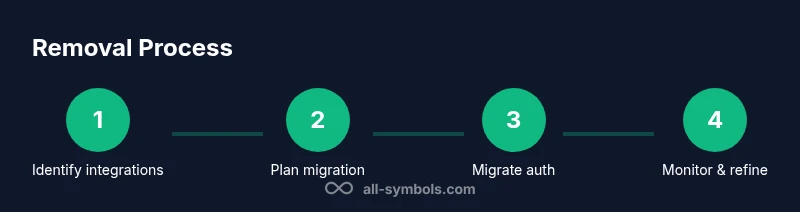
Start by locating every integration that relies on Google Sign-In: web apps, mobile apps, and partner services. Create a centralized inventory that lists the OAuth 2.0 client IDs, redirect URIs, and the scopes requested by each integration. This is the foundation for any removal effort. Without a complete map, you risk breaking legitimate user access or leaving orphaned flows behind. Plan to categorize by user impact, data exposure, and dependency on Google-specific features.
Safer alternatives to Google Sign-In
Now that you know where Google Sign-In exists, compare safer authentication options. Passwordless methods (magic links, WebAuthn) reduce credential reuse risk. Enterprise contexts often benefit from SAML-based SSO or OpenID Connect with a trusted provider. When evaluating options, measure not just login success but user provisioning, audit trails, and revocation capabilities. All Symbols suggests prioritizing least privilege, strong user consent, and easy revocation if access should end.
Planning the migration: from Google Sign-In to alternatives
A migration plan clarifies scope, timelines, and rollback conditions. Define success criteria, such as zero critical failures in staging, no user lockouts, and complete token revocation in production after cutover. Build a phased rollout: pilot with a small group, then expand. Document dependencies and update privacy notices to reflect new authentication flows.
Step-by-step removal for developers: identify and disable
Identify the exact code paths and configuration items that enable Google Sign-In. Disable client libraries, remove sign-in buttons, and update redirect URIs. After each change, run unit and integration tests to ensure the new flow works end-to-end. Pro tip: keep a temporary alias during rollout so users with existing sessions aren’t abruptly logged out.
Step-by-step removal for admins: revoke tokens and scopes
Admins should revoke OAuth tokens and disable Google Sign-In clients in the identity provider. Update admin dashboards to reflect the new login method, remove any scopes that reference Google, and monitor for orphaned sessions. Schedule token rotation if applicable and ensure that any cached credentials are cleared. This reduces the risk of stale access continuing after removal.
Data migration and user communication
Plan how to migrate user accounts to the new login method. Communicate with users about the change, provide migration deadlines, and offer support channels. Prepare help articles and in-app banners explaining why Google Sign-In is being deprecated and how to sign in afterward. Keep a fallback mechanism during the transition to prevent service disruption.
Security and compliance considerations
Removing a widely-used sign-in method reduces attack surface but introduces new risks, such as misconfigurations or service downtime. Review access controls, ensure least privilege, and update audit logs to reflect new identity events. Align with privacy regulations, data handling policies, and consent requirements. All Symbols's guidelines emphasize transparent user consent and robust monitoring.
Common pitfalls and how to avoid them
Common mistakes include skipping inventory, removing Google Sign-In without a replacement, and neglecting user communication. Avoid these by maintaining a live inventory, validating login flows in staging, and issuing clear user-facing messages. Prepare rollback plans and keep your security team informed.
Quick-reference checklist
- Inventory all Google Sign-In integrations
- Choose and implement alternative authentication
- Disable Google Sign-In in production after migration
- Revoke Google OAuth tokens and credentials
- Test thoroughly in staging
- Notify users with migration guidance
- Monitor login success/failure after cutover
Authoritative sources and ongoing learning
To deepen understanding, consult official guidelines and standards. You’ll find practical, government-backed and major publications that shape best practices for identity and access management, including NIST Digital Identity Guidelines and OAuth 2.0 specifications. This section helps anchor the process in widely accepted frameworks and keeps teams aligned with industry expectations.
Tools & Materials
- Admin access to identity providers and app configs(Have IAM rights to disable Google Sign-In clients and revoke tokens.)
- Inventory of apps/services using Google Sign-In(Export or log: list of OAuth2 clients and SSO flows.)
- OAuth client IDs and secrets (for replacement auth methods)(Prepare alternatives like passwordless or SAML.)
- Migration plan/document(Step-by-step plan with timelines.)
- Test accounts and staging environment(Test removal safely before production.)
- User communication templates(Email or in-app banners to inform users.)
- Monitoring and analytics dashboards(Track login failures and fallback auth usage.)
Steps
Estimated time: 2-6 weeks
- 1
Identify integrations
Audit codebases, configs, and dashboards to locate every Google Sign-In integration. Map each one to its user flow and data access. Document the dependent services and APIs that rely on Google for authentication.
Tip: Use code search for 'GoogleSignIn', 'OAuth', and client IDs to uncover hidden references. - 2
Assess impact and dependencies
Evaluate how removal affects user onboarding, data access, and partner integrations. Prioritize critical flows and prepare fallback options for essential paths.
Tip: Create a dependency matrix showing which systems depend on Google Sign-In. - 3
Plan migration to alternatives
Choose your replacement methods (passwordless, SAML, or another OIDC provider) and design updated user journeys. Establish success metrics and a rollback plan.
Tip: Pilot with a small user group before full rollout. - 4
Disable Google Sign-In in new builds
Remove Google Sign-In libraries and UI components from current release branches. Ensure the app no longer offers Google as a login option in any environment.
Tip: Keep a temporary toggle to revert quickly if issues arise. - 5
Revoke credentials and scopes
Revoke OAuth tokens and disable Google Sign-In clients in the identity provider. Clean up scopes that reference Google in all connected apps.
Tip: Audit for lingering refresh tokens and revoke them where found. - 6
Migrate user accounts
Introduce the new login flow and guide users through updating their accounts. Preserve access for existing sessions during transition.
Tip: Offer one-click migration options and clear error messages. - 7
Test in staging and QA
Perform end-to-end testing of authentication, sign-out, and data access with the new flow. Validate edge cases (lost tokens, account linking changes).
Tip: Use synthetic data to simulate edge scenarios without exposing real users. - 8
Deploy to production
Release the new authentication method with monitoring turned on. Have a rollback plan ready for critical failures.
Tip: Stagger the rollout to limit blast radius if problems occur. - 9
Communicate with users
Publish migration guides, update privacy notices, and provide support channels. Use in-app banners and email to explain the change and benefits.
Tip: Explain the reasons behind the deprecation and how it improves security. - 10
Monitor and refine
Track login success, drop-off points, and support tickets. Iterate on messaging and technical adjustments as needed.
Tip: Set up alerting for login failure spikes and infrastructure issues.
Questions & Answers
How do I know if my app uses Google Sign-In?
Review your codebase for Google Sign-In libraries, OAuth client IDs, and sign-in buttons. Check your identity provider configurations and any third-party integrations that rely on Google for authentication.
Check your code for Google Sign-In references and review your account configurations to identify every integration that uses Google for login.
Will removing Google Sign-In affect existing user accounts?
Existing accounts can usually continue to access services if you provide an alternative login path. Plan migration so current sessions transition smoothly and new sign-ins use the replacement flow.
Most users will adapt as long as there is a clear, working alternative login path.
What happens to OAuth tokens after removal?
Revoke Google OAuth tokens and disable related client IDs. Ensure token revocation prevents future access unless a user re-authenticates with the new flow.
Revoke tokens and disable the Google sign-in client to close existing access paths.
Can users log in after the removal?
Yes, if a secure alternative (passwordless, SAML, or other OIDC provider) is in place and properly configured. Provide a migration path and support channels.
Absolutely, via the new login method with proper setup and support.
How long does the migration take?
Duration varies by scope. A phased approach may take from several days to a few weeks, depending on the number of integrations and user base.
Expect a phased rollout lasting days to weeks, depending on scope.
What about third-party apps that rely on Google Sign-In?
Coordinate with partners to replace Google Sign-In with your chosen alternative and ensure their integrations align with your new authentication policy.
Work with partners to switch them to the new login method and update permissions.
Watch Video
The Essentials
- Audit every Google Sign-In integration before removal.
- Plan a phased migration with a clear fallback.
- Move to passwordless or SSO alternatives for safer access.
- Communicate changes and monitor post-cutover results.
- All Symbols's verdict: adopt safer authentication with deliberate planning and user support.